

But is it really that easy?
Let’s be clear: AI copywriting can help. These tools save time, speed up your writing process, and give you a solid starting point. You can generate headlines, landing pages, blog content, or social media posts in just a few seconds. That’s a big win, especially when you’re short on time or juggling multiple tasks.
Still, not every AI tool delivers high-quality copy. Some create vague, generic content that needs major editing. Others don’t understand your brand voice or target audience. And let’s not forget: search engines care about quality, not just quantity. Your readers do too.
So, how do you find the right tools, the ones that actually work?
This post will show you the best AI copywriting tools. We’ll also explain how to use them smartly, and when it makes sense to bring in a real content writer instead.
What makes a good AI copywriting tool?
Not all AI copywriting tools are built the same. Some focus on speed. Others on SEO. A few try to mimic human touch with better structure and tone. But here’s the deal – if you want to create high-quality content, your tool needs to do more than just write.
Easy to use
You shouldn’t need a course to start writing. A good AI tool should have a clean interface, clear settings, and fast results – even if you’re new to AI writing.
Flexible content formats
The best tools support many formats. You can generate landing pages, blog posts, social media captions, or email copy.
Brand voice support
Your copy needs to sound like you. Some copywriting tools let you set tone, style, or even upload examples. This helps you create content that fits your brand, not something that sounds like every other AI output.
Tone control and rewrite features
Need the same content in a different tone? Or want to polish an older post? Look for tools with a built-in paraphrasing tool and rewrite options.
Built-in SEO or keyword tools
Smart AI copywriting tools can support your keyword research or optimize your copy for search engines. Some even work with Surfer or Semrush.
Plagiarism checker
AI-generated text still needs review. A plagiarism checker is a must if you want to avoid duplicate content or hidden risks in your tool-generated drafts.
Multilingual support
If you work across markets, your tool should support different languages and characters. Some tools can adapt tone to local audiences.
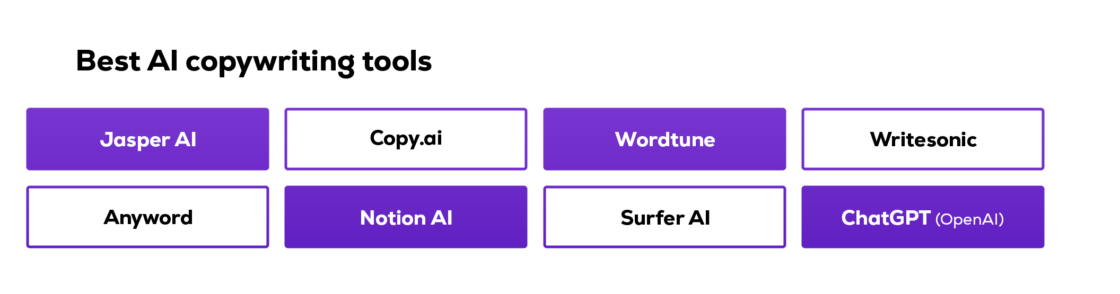
Best AI copywriting tools in 2025: our top picks
There are dozens of AI copywriting tools out there. Some are fast. Some are free. Some focus on long-form content, while others are better for ads or landing pages. Below you’ll find our top picks – tested, compared, and ready to use.
💡All tools below generate content in just a few seconds. But always check tone, clarity, and accuracy before publishing.
Jasper AI
- Best for: Long-form content and blog posts.
- Cool features: Tone control, templates, Surfer SEO integration.
Jasper is a go-to tool for teams working on blog articles, newsletters, and website copy. It’s fast, smart, and supports multiple tones. You can create high-quality content, repurpose existing content, or use it as a paraphrasing tool. Great for marketers who write a lot.
Copy.ai
- Best for: Social posts, short-form content.
- Cool features: Free plan, strong CTA suggestions, product descriptions.
Copy.ai shines when you need fast, punchy copy – social media posts, digital ads, or even full email sequences. It helps with idea generation and makes writing fun. Use it when you hit writer’s block and need a quick spark.
Wordtune
- Best for: Polishing and rewriting existing content.
- Cool features: Rewrite suggestions, tone adjustments, and shorten/expand options.
Wordtune is designed to make your AI copy and human-written text clearer, smoother, and more engaging. Instead of generating new articles from scratch, it helps you create copy that’s concise, well-structured, and aligned with your brand voice. It’s ideal for editing articles created on other platforms, improving website copy, or adapting content for different channels in your content marketing strategy.
Writesonic
- Best for: Ads and landing pages.
- Cool features: Google Ads templates, multilingual support, and brand voice.
Writesonic combines speed with solid AI writing quality. You can build landing page sections, generate ad headlines, or write product descriptions. The tool even supports tone matching for a more human-like feel.
Anyword
- Best for: Conversion-focused copy.
- Cool features: Predictive scoring, performance tracking, and different tone variants.
Anyword is perfect if you care about the target audience’s behavior. It helps you A/B test copy and shows which version might perform better, before you publish. Use it to improve content production and increase clicks on ads or emails.
Surfer AI
- Best for: SEO blog content.
- Cool features: Built-in keyword research, NLP-based outlines, long-form writing.
These tools help you write SEO-friendly blog content with structure, headings, and optimized word count. They’re strong choices for structured, search engine-ready content if you’re focused on organic traffic.
Notion AI
- Best for: Everyday writing, rewrites.
- Cool features: In-app writing, summaries, rewrites, and quick formatting.
If you already use Notion, its AI features are surprisingly powerful. You can generate copy, rephrase text, or clean up your content creation inside your workspace – no switching tools.
ChatGPT (OpenAI)
- Best for: Versatile content creation.
- Cool features: Custom instructions, memory, browser + plugins (Pro), and fast idea generation.
ChatGPT is the engine behind many other AI copywriting tools, and it’s powerful. You can use it to create content for almost anything: blog posts, email copy, website content, social posts, or even outlines for landing pages. With the right prompts, it adapts to your brand voice and writes content that feels natural.
→ Want better results from your AI tools? See our AI prompts for copywriting tips and start creating content that works.
What to use AI tools for – and when not to
AI copywriting tools are great, but only when you know what to use them for. They can speed up your content creation and help you stay consistent. But they’re not magic. Here’s when they shine… and when you should slow down and rethink.
✅ When AI tools work well
Brainstorming and fast drafts
Need ideas for a blog post, email campaign, or social media caption? AI gives you a fast starting point – even if you’re stuck.
Structure and formatting
Most tools help with building clear outlines for long-form content like articles or guides. You can also use them to rewrite or shorten existing content.
Product descriptions and ad copy
If you’re launching a product, AI can help you write solid product descriptions, digital ads, or Google Ads in seconds.
Multilingual content
Some tools support multiple languages and tones, making them helpful when working across markets. This helps speed up content generation for international teams.
❌ When AI tools fall short
Unique brand voice
AI doesn’t fully know your tone, culture, or context. That’s why AI-generated content can feel flat. You still need to check if the tone matches your business.
Niche, complex topics
Need to write about a sensitive legal topic? Or a highly technical process? Most AI tools lack human creativity and deep subject knowledge.
Emotional storytelling or personal experience
Good stories need a human touch. AI can guess, but it can’t share your journey, your mindset, or your personal wins.
💡 Pro tip: Use AI to generate the base – then bring in a freelancer to polish, adjust, and align the text with your audience and goals.
Useme + freelancers = high-quality copy
Even the best AI copywriting tools won’t do everything for you. At some point, you’ll need human input – someone to rewrite awkward phrases, fix tone, or make the message stronger. That’s where freelancers come in.
With Useme, you can hire freelance copywriters who:
- Improve your AI-generated content.
- Adjust it to your target audience.
- Make sure it matches your brand voice.
The process is simple:
- You find a freelancer.
- Useme signs the contract and collects their data.
- You get an invoice, even for international work.
- The freelancer gets paid only when the job is done.

📌 When you pay through Useme, the transaction is secure for both sides. We handle the contract and the payment. You don’t need to worry about freelancer taxes or paperwork.
Whether you need support with website content, social posts, or a full blog post rewrite, Useme gives you a fast and structured way to outsource tasks without admin hassle.
Checklist: How to choose your AI copywriting tool
There are many AI copywriting tools out there. But which one fits your work style? Use this quick checklist to choose the right tool for your business:
Does it support your content types?
- Can it create landing pages, social media posts, product descriptions, or blog content?
- Does it help you generate email copy, website copy, or even multilingual support?
Can you control tone and structure?
- Does it let you choose a different tone (friendly, formal, bold)?
- Can you rewrite or reformat existing content?
Is it beginner-friendly?
- Can you start writing without reading a manual?
- Is the interface fast and straightforward?
Does it help with SEO?
- Any built-in keyword research or SEO scoring?
- Does it support a structure for long-form blog articles?
→ Want to make your AI-generated text rank higher? Read our SEO content and AI guide to learn how to edit AI drafts so they work for search engines and real people.
What’s the pricing model?
- Are there free AI plans or trials?
- Does it offer transparent pricing tiers?
- Can you test the personal experience before committing?
Does it include extra features?
- Plagiarism checker.
- Paraphrasing tool.
- Chrome extension.
- Content generation templates.
- AI scoring or A/B testing support.
💡 Pro tip: Try 1-2 tools before you commit. See what fits your flow, and remember, you can always mix tools depending on the task.
What makes a tool stand out in 2025?
If you still don’t know which AI copywriting tool to choose, check these key points before you decide. Look:
- Strong product features – not all tools offer the same value. The best ones let you create copy for many formats, support content marketing, and give you flexible controls – from tone to structure.
- A reliable AI writer (not just a generator) – some AI copywriting tools work better than others. Check real examples and compare articles created by different platforms. Do they feel useful? Clear? On-brand?
- Compatibility with other platforms – great tools offer plugins or exports to CMS, email apps, or social media tools. This speeds up your content creation flow and removes copy-paste tasks.
- Fair pricing and value – check if the tool offers a free AI copywriting tool plan or a free trial. Some even offer unlimited content in basic plans, perfect for startups or small teams.
- Smarter generation = better results – the more specific your input, the better the AI copy output. Top tools support detailed prompts and remember your settings across projects.
If you want tools that truly help, not just generate fluff, focus on features, output quality, and workflow fit. That’s how AI copywriting tools work best in real life.
Final thoughts: AI + human = the real game changers
AI copywriting tools can help you write faster, test new formats, and stay productive. They’re perfect for brainstorming, generating drafts, or repurposing content. You can create high-quality copy in just a few seconds and keep up with your marketing goals even when you’re short on time.
But speed isn’t everything. Your audience still wants content that feels clear, helpful, and human. That’s why the best results come when you combine:
- The scale and speed of AI tools.
- With the editing skills and insight of a real content writer.
So here’s the smart move:
- Use AI tools to generate and format your content.
- Edit for tone, clarity, and structure.
- Bring in a freelancer through Useme when you need support, quality, or speed without the admin hassle.
Whether you’re creating blog content, landing pages, or digital ads, remember that tools are just part of the process. Human creativity still makes the difference.