
Final touches, client approval, and that’s it – you’re ready to send the invoice and move on to your next project. So you click the familiar “Invoice a client” button and then…
You’ll see a brand-new form!
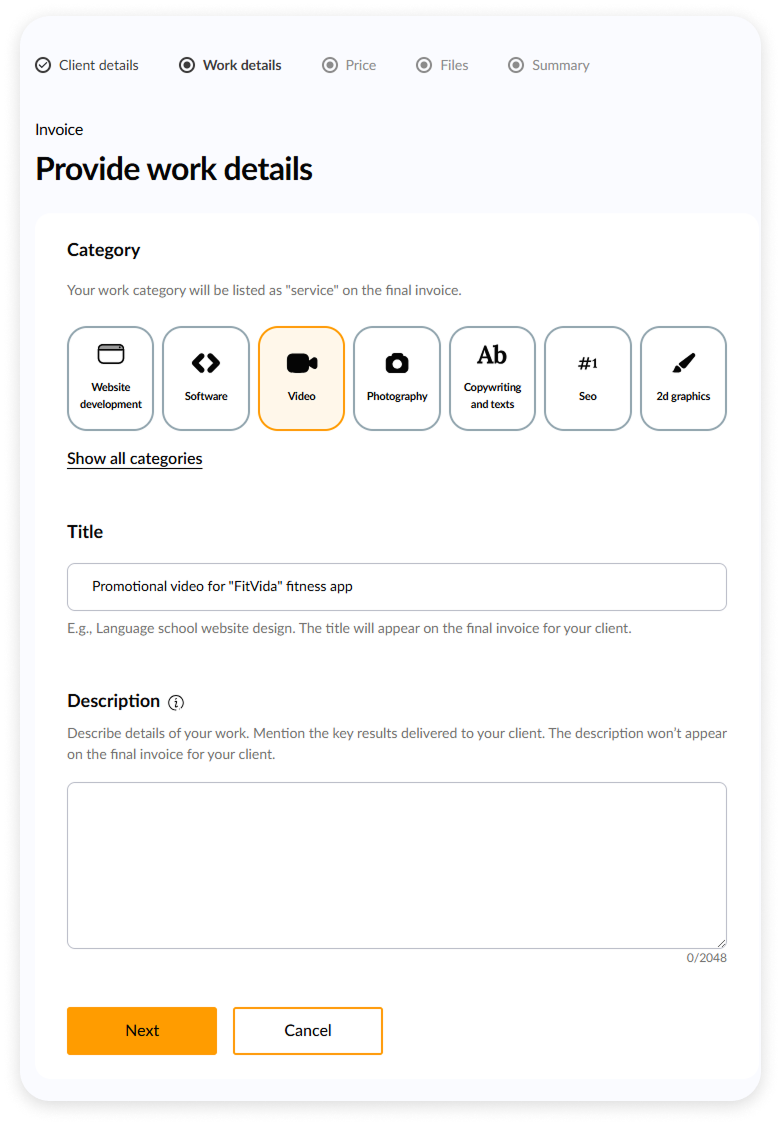
Client details come first
The main change is the step order. Now, right at the beginning, we’ll ask for your client’s email and business or personal details.
File upload moved to the end
We still need work files to confirm the job is done, but that step now comes last. First, you fill in client info, describe the job, set your price – and only then upload your files right before the summary.
Anyway, on-screen hints will guide you through it!
New design, same purpose
Since last year, our UX team has been gradually launching a new, consistent design system. You’ll now see a cleaner layout and updated colors that match the rest of the platform.
Take a look around!
Explore our brand-new form in the product tour and try invoicing yourself. Enjoy! 🎉